Why Is My Webflow Site Not Showing on Google? A Troubleshooting Workflow
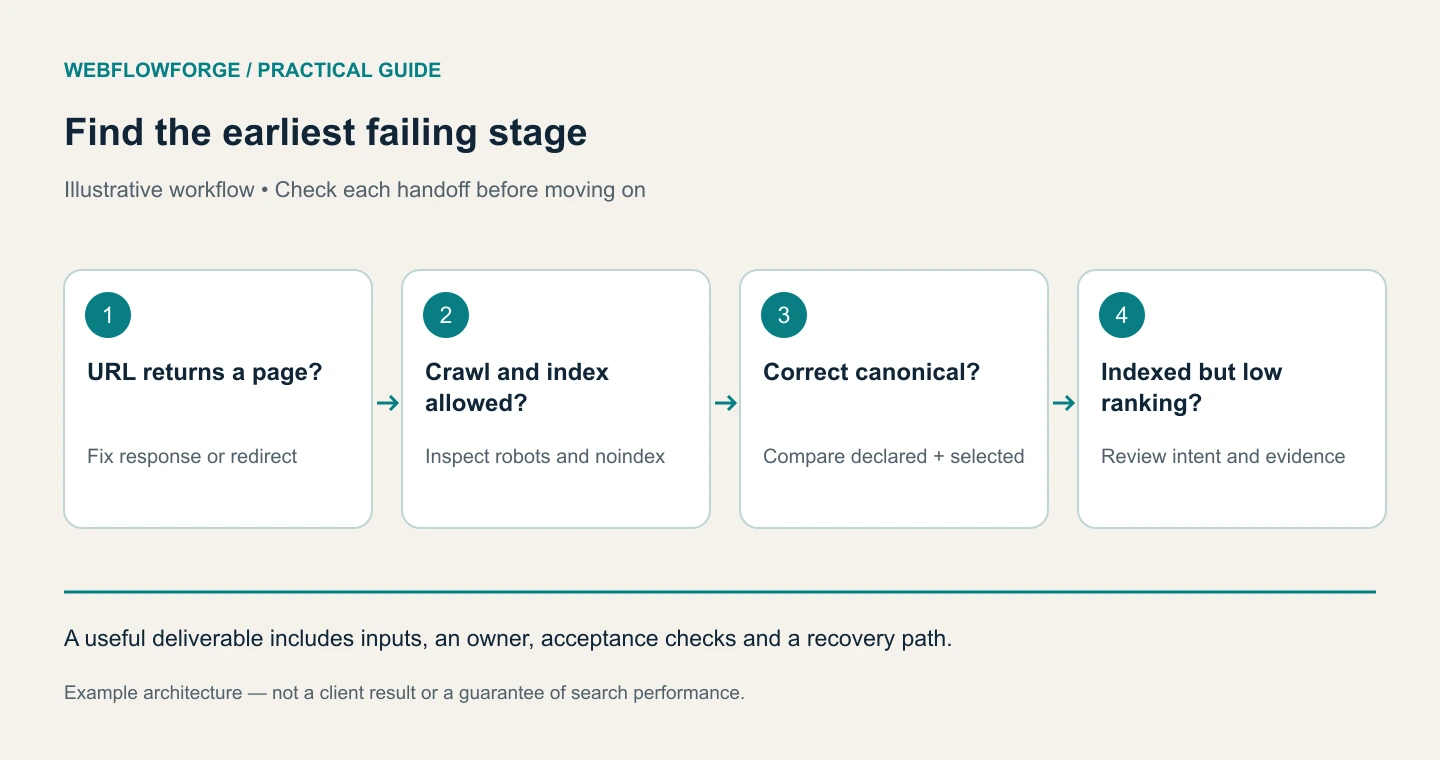
First distinguish an indexing problem from a ranking problem. If Google has indexed the correct URL but it appears far down the results, submitting it again will not solve weak relevance or competition. We would inspect one affected URL, identify the earliest failing stage, fix that cause, and verify the change before repeating the process across a template.
This workflow uses an illustrative service page and a CMS article. The examples explain diagnosis, not a guaranteed route into Google's index.
Confirm the URL you actually want indexed
Record the full preferred URL, including protocol and hostname. Check whether it returns a successful page or redirects elsewhere. Open the URL directly rather than relying on a navigation link that may point to an old slug.
Use Search Console URL Inspection for the exact property and URL. Note the indexed status, Google's selected canonical, the user-declared canonical, last crawl information, and reported exclusion. Compare the indexed result with a live test. A site search can be a quick clue, but it is not a complete inventory of indexed pages.
The URL Inspection documentation explains the distinction between indexed information and live testing. Save the observation date: reports can lag behind a recently deployed fix.
Want to apply this to your setup?
If Google cannot access it, fix the response path
Check for a 404, authentication requirement, server error, redirect loop, or bot restriction. If the URL is intentionally retired, the error may be correct. If it is a current service page, repair the page or its intended redirect.
Inspect robots.txt separately. Blocking crawling does not reliably remove a known URL from search, and Google may be unable to see a noindex directive on a blocked page. A page intended for search should have compatible crawl permissions and indexing signals.
In an illustrative case, the sitemap lists /services/crm-integration, but the current page lives at /webflow-hubspot-integration. We would correct the internal and sitemap references and use a relevant redirect where the old URL should continue to work. We would not keep submitting the obsolete URL.
If the page says noindex, establish whether that is intentional
Inspect the published HTML and relevant response headers, plus any template or site-level controls. A staging setting, custom code block, or inherited template can affect many pages. Change only the unintended directive, then verify the public output after publishing.
Keep utility pages such as private confirmation screens out of the search strategy when that matches their purpose. “Every URL indexed” is not a useful success criterion. The target is that valuable public pages are eligible and discoverable.
If Google chooses another canonical, compare both pages
Read the declared canonical and the chosen URL. Compare content, redirects, internal links, and sitemap inclusion. A CMS article that accidentally declares the homepage as canonical sends an inconsistent signal. A genuine duplicate with the correct canonical may need no repair.
Do not change canonical tags simply because the selected URL differs from your preference. Investigate why: duplicate paths, hostname variants, substantially similar content, and conflicting link signals are possible causes. Google's canonical consolidation guidance explains the available signals.
If it is crawled or discovered but not indexed, inspect value and discovery
Confirm the page has meaningful visible content, a clear purpose, and relevant internal links. Compare it with existing articles answering the same question. A second short guide that repeats the first may need consolidation or a distinct scope, rather than another indexing request.
For a useful new article, link it from the relevant service or resource hub and include it in the sitemap. Improve missing instructions, examples, or evidence. A generic paragraph with a keyword in its heading is rarely enough to solve the reader's problem.
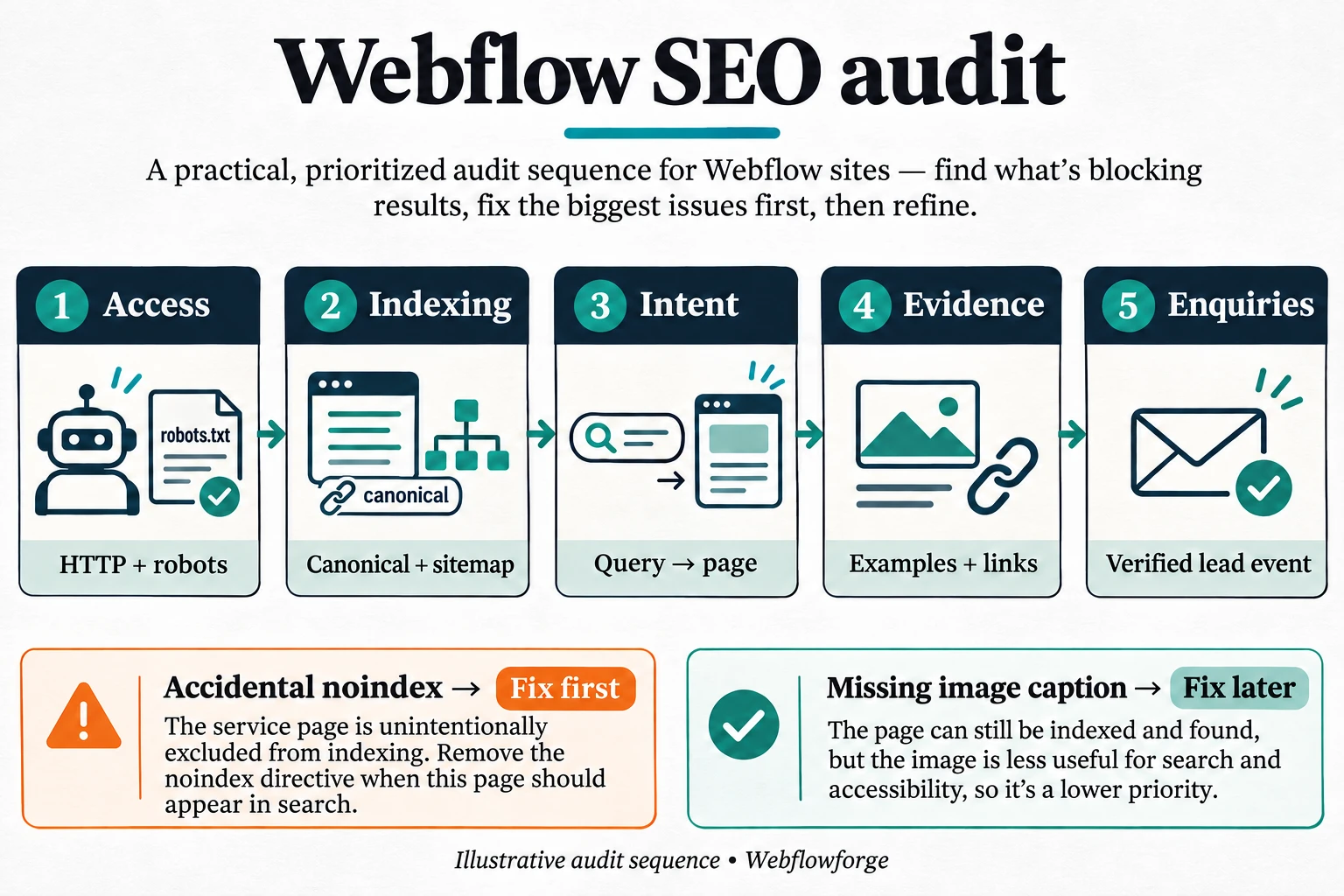
Review our SEO audit workflow for prioritization and the pre-design playbook for planning a clearer content structure.
Use Codex to turn observations into a decision log
Codex can compare exports and prepare checks, but it needs actual inspection evidence to diagnose account-only information. Give it the exact URL observations rather than asking it to guess Google's reason.
Analyze the supplied URL Inspection observations and current crawl.
For each wanted URL, classify: access failure, unintended noindex,
canonical conflict, discovery/content issue, or indexed but low ranking.
Keep observed facts separate from hypotheses. Cite the evidence file.
Suggest the smallest correction and its verification step.
Do not remove intentional exclusions or redirect unrelated pages.
Return a decision log with owner, status and follow-up date.
We would choose one affected page from each template, repair and verify it, then check whether the same cause affects the remaining records. This prevents a wrong diagnosis from turning into a site-wide change.
What to verify after the fix
Confirm the current response, visible content, canonical, directives, and incoming links. Submit the corrected sitemap if needed and request indexing for important corrected URLs through the supported interface. Record when the request was made. Repeated requests do not create a reliable priority lane.
Follow the report over time and separate successful technical repair from eventual indexing. Google's AI features guidance also requires a supporting page to be indexed and eligible for a search snippet; an AI-focused file does not solve an ordinary indexing block.
Frequently Asked Questions
There is no guaranteed deadline. Discovery, crawling, processing, and quality evaluation vary. Verify eligibility and useful discovery signals, then monitor rather than promising a specific number of days.
No. It can still contain noindex, point its canonical elsewhere, require rendering Google cannot complete, or provide little useful content.
No. Redirect to a relevant replacement when one exists. Keep a proper removal response for content that has genuinely disappeared without an equivalent.