How to Connect Webflow SEO Traffic to Qualified Pipeline With GA4 and HubSpot
To connect SEO activity to pipeline, you need a reliable enquiry record, consistent source fields and an agreed definition of a qualified opportunity. GA4 explains aggregate website behavior; the CRM explains the sales process. Neither system alone provides a complete or perfectly causal account of why a customer bought.
We would use Codex to help build and test the measurement contract between Webflow, Google Tag Manager, GA4 and HubSpot. This workflow uses synthetic examples. It does not require sending names, email addresses or private sales notes to an AI assistant or analytics tool.
Define the business states before the events
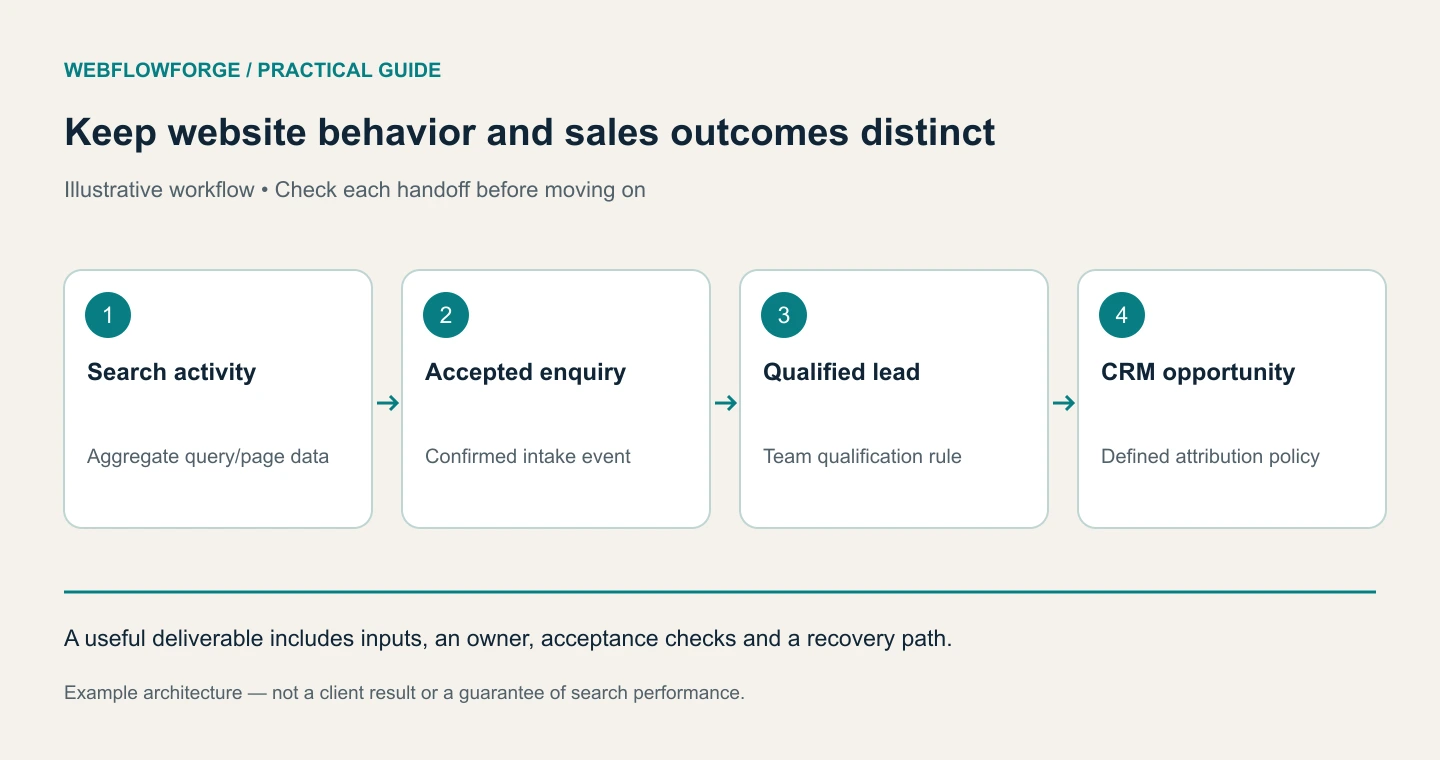
Write down what counts as an enquiry, a qualified lead and an opportunity. An enquiry might be a successfully accepted service request. Qualification could require a relevant problem, an identifiable organization and an agreed next step. An opportunity should follow your actual CRM process rather than be created automatically for every download.
Assign an owner to the definitions. Otherwise, marketing may count every form response while sales counts only accepted opportunities, and both dashboards can be technically correct but impossible to compare.
Use separate metrics for article visits, accepted enquiries, qualified leads, opportunities and won revenue. These represent different stages and should not be collapsed into one conversion rate without explaining the denominator and time window.
Want to apply this to your setup?
Capture source context deliberately
Define first-known source and enquiry-time source as separate fields. A person may first discover an SEO guide, return through a newsletter and submit later. Overwriting the first source with every visit removes useful history; retaining only the first source hides the final interaction.
Capture approved UTM parameters, landing-page context and referrer information where consent and your implementation allow it. Validate values, limit lengths and avoid storing sensitive query-string contents. An internal link should not carry campaign UTMs that overwrite the external acquisition story.
Start with our Webflow UTM capture guide, then document how the captured fields map to HubSpot. Browser storage alone is not a durable CRM record.
Fire the lead event on confirmed success
A click on “Submit” can fail validation. A thank-you page can be reloaded. A booking link can be opened without a meeting being booked. Choose a trigger that corresponds to the successful business action you can actually verify.
For example, after a successful intake response, the application might emit this synthetic data-layer event:
window.dataLayer = window.dataLayer || [];
window.dataLayer.push({
  event: 'lead_submitted',
  lead_form: 'contact_service_request',
  lead_service: 'crm_integration',
  submission_ref: 'sub_7f3c2a91' // opaque intake ID, never an email or name
});
In GTM, an exact custom-event trigger can map this to an appropriate GA4 event such as generate_lead, with approved non-personal parameters. The example belongs in the confirmed-success path, not a generic button click handler. Read Google's data-layer documentation before implementing the container behavior.
Prevent repeat emission for the same accepted submission in the application flow. Do not assume that adding an arbitrary event_id automatically deduplicates every GA4 web event. Also check whether an existing tag or integration already sends the same lead event.
For external booking tools, use a supported confirmation integration or verified server event if available. A click on the booking link remains a click until you have evidence of completion. Any server-side analytics implementation must respect the applicable consent state and platform requirements.
Keep delivery identity separate from analytics identity
The intake system needs a stable submission ID for retries and reconciliation. The CRM needs the contact and enquiry information required to serve the request. That does not mean the full record belongs in GA4.
Use an explicit allowlist for analytics fields. Keep email addresses, names, phone numbers and message text out of event parameters, page URLs and page titles sent to analytics. See Google's guidance on avoiding personally identifiable information.
For reliable operational delivery, follow our Webflow-to-HubSpot and Slack workflow. A CRM retry should not generate a new business enquiry, and a Slack retry should not repeat either the CRM write or the analytics success event.
Use Codex to build a testable event contract
We would provide the event dictionary, synthetic form responses and sanitized GTM configuration. Codex can identify duplicate trigger paths and create focused tests.
Review this Webflow lead-event implementation against the contract.
Test validation failure, network failure, successful intake,
double-click, refresh, CRM retry and consent-denied behavior.
Find duplicate tag paths and any personal data sent to analytics.
Do not infer a completed booking from a booking-link click.
Return proposed changes and observed test results separately.
Verify behavior in GTM Preview and the relevant GA4 debugging tools. Inspect the payload itself, not just a green “tag fired” indicator. Test an unsuccessful submission as carefully as a successful one.
Reconcile website activity with CRM outcomes
Create a regular report showing accepted enquiries by captured source and landing page, then their progression to qualification and opportunity. Retain an unknown-source bucket. Missing consent, cross-device visits, manual CRM entry and private sharing create real gaps.
Define how opportunities with multiple contacts receive credit. For example, you might report the earliest known enquiry associated with the opportunity while also preserving other participating contacts. Label that as your reporting rule, not proof that the credited page caused the sale.
Do not join aggregate Search Console queries to individual CRM contacts and claim to know their exact search terms. Search Console query/page data is useful for content planning; it is not a person-level attribution feed. Compare those trends alongside enquiry outcomes at an appropriate aggregate level.
Frequently Asked Questions
They may use different definitions, time zones, consent conditions, deduplication and processing windows. Reconcile the business event first, then investigate the tracking path instead of forcing the totals to match..
Some visits expose identifiable referral sources; others do not. Preserve observable referral context and optionally ask how the person found you. Neither method captures every AI-influenced journey, so report the limits.
Only if that matches the sales process. Usually a submission creates or updates an enquiry/contact, while opportunity creation follows a qualification decision.