How to Build an Internal Linking System for Webflow With Codex
Internal linking becomes difficult when a growing library contains overlapping guides, old service URLs and articles that never lead readers toward a useful next step. We would create a page inventory, assign one primary page to each intent, and add contextual links where they help a reader complete the task.
This workflow uses Codex to prepare a reviewable link map. The example is an illustrative Webflow site offering migration, SEO and CRM integration services. The goal is useful navigation and clearer relationships between pages, not a fixed number of keyword links.
Inventory URLs and their jobs
Export published CMS items and include static service pages, case studies and relevant resources. Record the canonical URL, page type, title, main query or intent, status and existing internal links. Include redirects so the system does not recommend an old URL simply because it appears in historical content.
Separate different buyer tasks. A migration workflow explains execution. A migration cost guide helps someone estimate scope. A migration service page explains what they can hire us to do. These pages can support one another without all trying to be the primary answer to the same question.
If two articles both answer the same question with little unique value, decide whether to merge or differentiate them before adding more links. Internal linking does not resolve a confused content plan by itself.
Want to apply this to your setup?
Design the route a reader needs
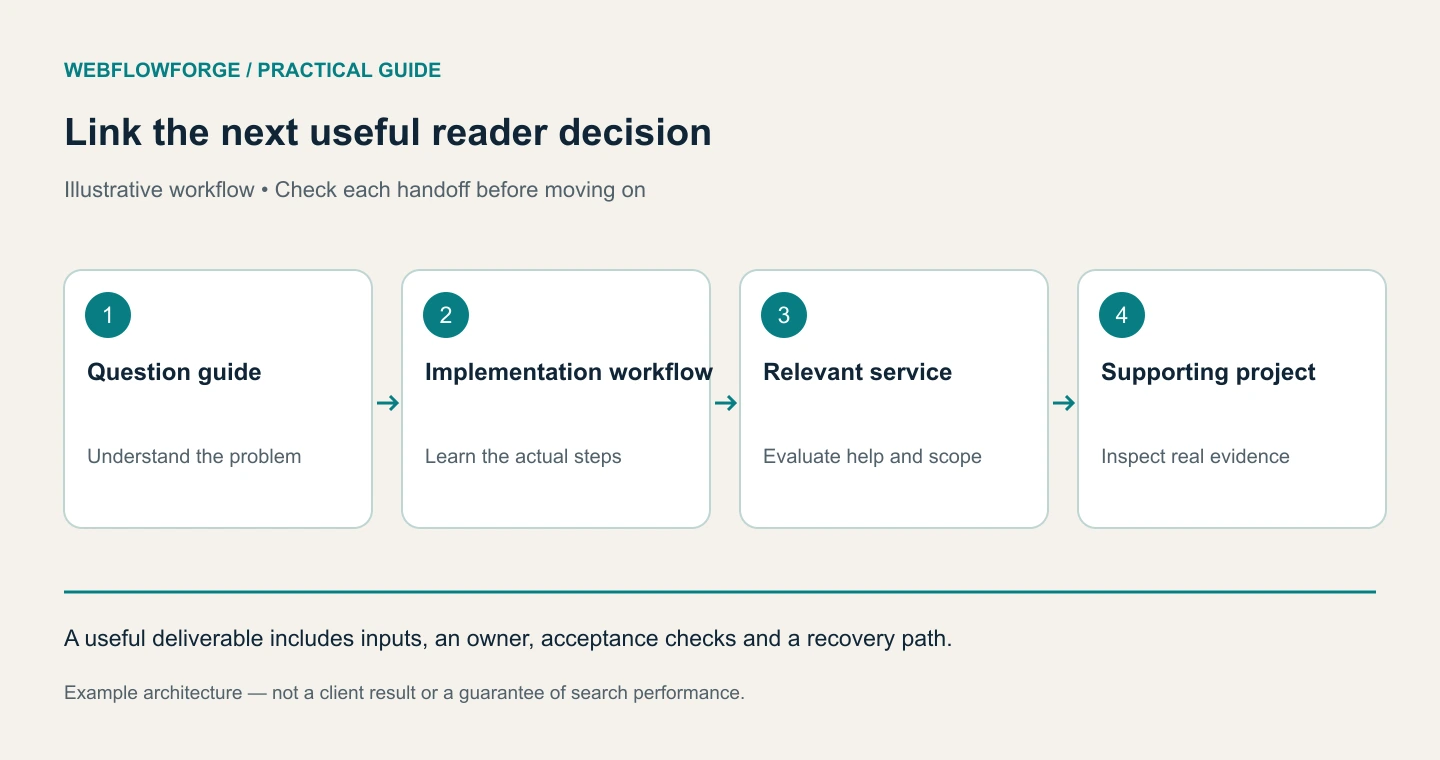
Take a visitor reading about missing Webflow leads. The useful next step might be a guide to reliable CRM delivery, followed by the relevant integration service. A link to a generic design article is less helpful even if it contains a matching keyword.
For each article, ask three questions: what prerequisite might the reader need, what comes next in implementation, and what evidence would help them trust the proposed approach? These produce links to foundational guides, related workflows and genuine case studies.
For example, a WordPress migration workflow can point to the migration service at the point where the reader needs help owning redirects, content transfer and launch checks. An SEO audit can point to the redesign SEO checklist when a redesign is the trigger.
Let Codex propose edits, not insert links everywhere
We would provide the approved inventory and exported article HTML. Codex should select targets only from that inventory, preserve the existing meaning and avoid links inside code examples, headings that would become awkward, or already-linked text.
Using only approved-pages.csv, propose contextual internal links
for these exported articles. Return source_url, target_url,
current_sentence, proposed_sentence and a specific reader benefit.
Reject self-links, redirected targets, duplicate links in a paragraph
and suggestions that imply evidence the target does not contain.
Do not modify the CMS. Flag overlapping search intent separately.
The output should be a small editorial queue. A useful suggestion explains why the destination answers the next question. “Contains the keyword Webflow” is not a sufficient reason.
We would also run a deterministic URL check: every target must be an approved production URL, return an appropriate page and match the intended canonical. A language model's suggestion cannot establish that a page exists.
Review anchors in their sentences
Good anchor text describes the destination naturally. “Follow the Webflow migration checklist” is clearer than “click here.” Repeating an identical commercial keyword in every article can make the copy clumsy and distract from the actual task.
Keep the link close to the sentence that explains its value. A paragraph about preventing duplicate CRM records can link to a duplicate-prevention workflow. A closing service invitation can link to Webflow HubSpot integration. Those links have different jobs and should be written accordingly.
Use standard crawlable links with real href destinations. Google's crawlable-links guidance explains the basics. Avoid making important navigation depend solely on JavaScript click handlers.
Stage changes without overwriting newer edits
Back up each item's current rich-text field. Before applying an approved change, read it again and compare it with the reviewed version. If an editor has changed the article, regenerate the patch against the new content instead of replacing the whole field with an old export.
Pilot one article and inspect the rendered result. Confirm the linked words, punctuation, destination and mobile layout. Then apply the remaining reviewed changes in a logged batch. Record the item ID, field, before value, after value and verification result so a mistaken edit is recoverable.
This uses the same principles as our Webflow MCP publishing workflow. Template navigation changes require separate testing because one edit can affect every item in a collection.
Measure whether the route works
Re-crawl the changed pages and check for orphaned important content, broken links and unnecessarily deep routes from relevant hubs. Compare Search Console query/page patterns over an appropriate period, allowing for other site changes and seasonality.
For conversion, inspect whether readers reach the service or contact step and whether qualified enquiries result. More internal-link clicks alone are not proof of a better business outcome. An article can answer a question completely without generating a click, so interpret the behavior in context.
Frequently Asked Questions
There is no universal target. Add links that explain prerequisites, next steps, evidence or a relevant service. Remove unnecessary repetitions and links that interrupt the answer.
No. Link to the service that fits the problem being solved. A migration guide does not need unrelated links to every offer in the business.
It can help inventory and propose changes, but the site owner still needs to review meaning and evidence. URL validation and staged content checks catch different problems from editorial review.