What Is the Best Way to Automate Lead Capture from a Website? (Webflow → HubSpot & Salesforce)
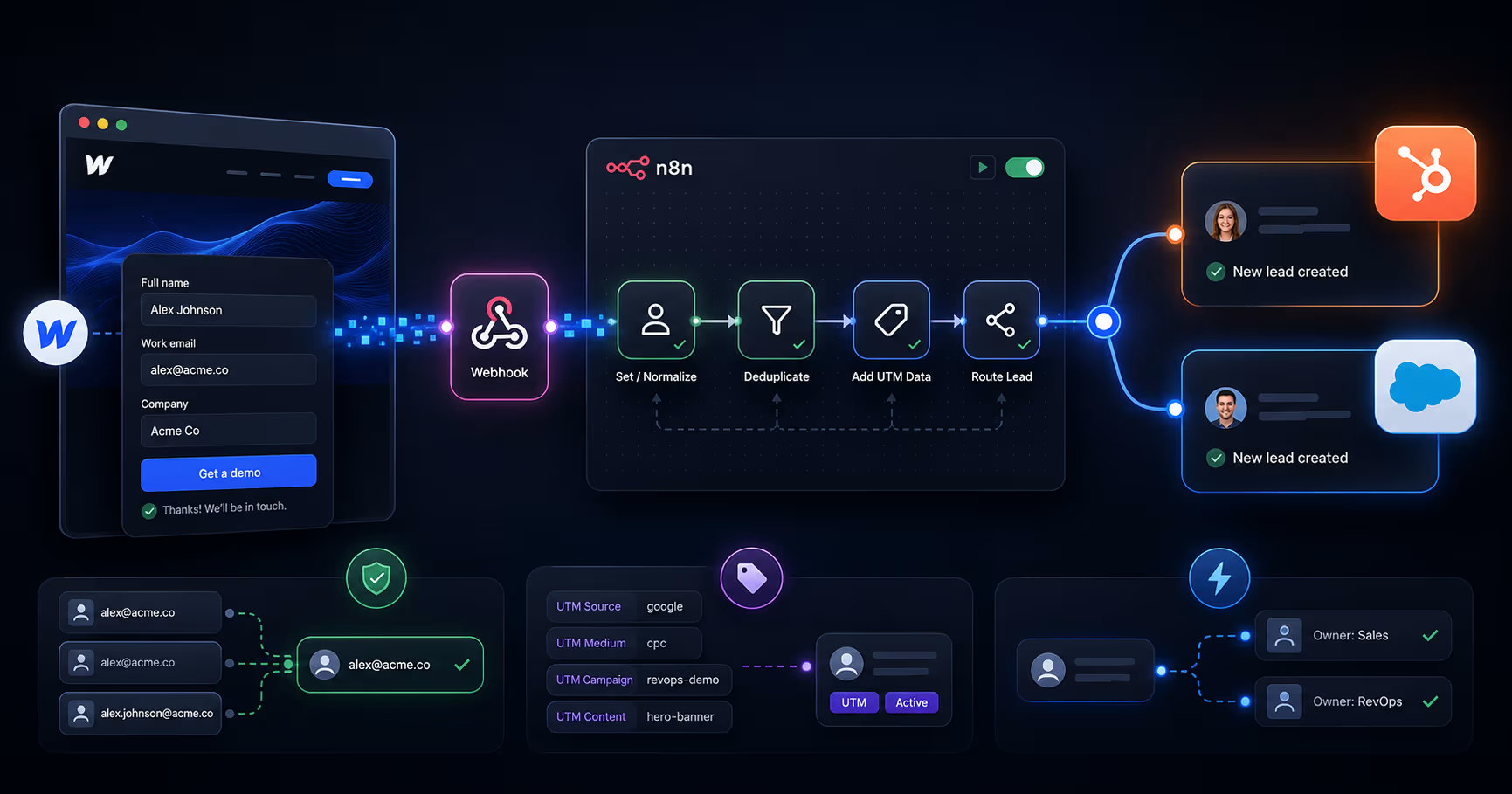


The best way to automate lead capture from a website is a three-layer pipeline: a form that captures full context (fields + attribution + cookies), a middleware layer (n8n or Make) that normalizes, dedupes, and enriches every submission, and a CRM write (HubSpot or Salesforce) that lands the lead already routed to an owner. Email notifications are not lead capture. A form that only sends email is a lead leak with a UI.
This guide is the full technical build — Webflow front end, n8n middleware, HubSpot and Salesforce endpoints, with copy-adaptable code.
The reference architecture
Every reliable lead capture automation — regardless of stack — runs the same eight stages:
- Capture — the Webflow form collects visible fields plus hidden context: UTM parameters,
gclid, referrer, landing page, and the CRM cookie (hubspotutkfor HubSpot). - Transport — the submission fires a webhook to your middleware (never point forms straight at the CRM if you need logic).
- Normalize — lowercase the email, parse the company domain, coerce field types.
- Dedupe — search the CRM by email, then by domain, before writing. Update-and-log beats create-a-twin.
- Enrich — append firmographics (or an LLM-based fit score) so routing has something to route on.
- Write — upsert into HubSpot or Salesforce with full attribution attached.
- Route — assign an owner by territory/segment rules and set an SLA timer.
- Alert — Slack ping with lead context and a one-click CRM link. Speed-to-lead is the whole game: response within 5 minutes vs 30 minutes is the difference between a meeting and voicemail.
Three ways to build it — compared
The middleware pattern wins for most teams: native-level reliability, custom-level control, and the logic lives in one auditable place. For a deeper comparison of the orchestration tools themselves, see Make vs Zapier vs n8n.
The build: Webflow form → n8n → HubSpot / Salesforce
Step 1 — Capture attribution client-side (site-wide script)
First-touch attribution must persist across pages, so store it on arrival and inject it at submit time:
document.addEventListener('DOMContentLoaded', function () {  var KEYS = ['utm_source','utm_medium','utm_campaign','utm_term','utm_content','gclid'];
  var qs = new URLSearchParams(location.search);
  // First touch: store once, never overwrite
  KEYS.forEach(function (k) {
    var v = qs.get(k);    if (v && !localStorage.getItem('ft_' + k))
    localStorage.setItem('ft_' + k, v);  });  if (!localStorage.getItem('ft_referrer'))
    localStorage.setItem('ft_referrer', document.referrer || 'direct');  if (!localStorage.getItem('ft_landing'))
    localStorage.setItem('ft_landing', location.pathname);
	// Inject into hidden form fields on every page
    KEYS.concat(['referrer','landing']).forEach(function (k) {
      var f = document.querySelector('input[name="' + k + '"]');
      if (f) f.value = localStorage.getItem('ft_' + k) || '';  });
      // HubSpot cookie — ties the submission to the full browsing session
      var hutk = document.cookie.match(/hubspotutk=([^;]+)/);
      var hf = document.querySelector('input[name="hutk"]');
      if (hutk && hf) hf.value = hutk[1];
});
Add matching hidden inputs (utm_source, gclid, hutk, etc.) inside the Webflow form block.
Step 2 — Webhook to n8n, then normalize + dedupe
Point the form at an n8n Webhook node (Site Settings → Forms webhook, or a small fetch on submit). Then one Code node does the hygiene:
// n8n Code node: normalize and prepare for dedupe
const d = $json.body || $json;const email = (d.email || '').trim().toLowerCase();
const domain = email.split('@')[1] || '';const FREE = ['gmail.com','outlook.com','yahoo.com','hotmail.com'];
return [
{
  json: {  email,  firstName: (d.name || '').split(' ')[0],
           company: d.company || (FREE.includes(domain) ? '' : domain),
           companyDomain: FREE.includes(domain) ? '' : domain,
          utm_source: d.utm_source, utm_medium: d.utm_medium,  utm_campaign: d.utm_campaign, gclid: d.gclid,
          referrer: d.referrer, landing: d.landing, hutk: d.hutk,  message: d.message}
        }
];
Next node: HubSpot → Search contact by email (or Salesforce SOQL SELECT Id FROM Lead WHERE Email = ...). Found → update + log activity. Not found → create. That single branch eliminates the duplicate problem natively-integrated forms are famous for.
Step 3a — HubSpot write (Forms API v3 — dedupes by cookie natively)
POST https://api.hsforms.com/submissions/v3/integration/submit/{portalId}/{formGuid}{
"fields": [
  { "name": "email", "value": "{{email}}" },
  { "name": "firstname", "value": "{{firstName}}" },
  { "name": "company", "value": "{{company}}" },
  { "name": "utm_source__first_touch", "value": "{{utm_source}}" },
  { "name": "gclid", "value": "{{gclid}}" }  ],
  "context":
  {    "hutk": "{{hutk}}",    "pageUri": "{{landing}}",    "pageName": "Lead form"  }
}
The hutk in context is what merges the submission into the visitor's existing contact and analytics history — skip it and you get duplicates plus “Direct traffic” attribution.
Step 3b — Salesforce write (REST upsert — idempotent by design)
PATCH https://yourInstance.my.salesforce.com/services/data/v61.0/sobjects/Lead/Email__c/{
{email}}
Authorization: Bearer {{sf_access_token}}
{
  "FirstName": "{{firstName}}",
  "Company": "{{company}}",
  "LeadSource": "{{utm_source}}",
  "UTM_Campaign__c": "{{utm_campaign}}",
  "GCLID__c": "{{gclid}}",
  "Landing_Page__c": "{{landing}}"
}
Upserting on an external ID field (here a unique Email__c) means the same call safely creates or updates — no duplicate Leads, no pre-search required. Avoid classic Web-to-Lead if you care about attribution: it accepts whatever the form posts, dedupes nothing, and retries nothing.
Want to apply this to your setup?
Routing, error handling, and the mistakes that cost pipeline
Routing and SLA — the last mile
After the CRM write, two more n8n nodes finish the job: an owner-assignment step (round-robin within segment, or territory rules from a lookup table) and a Slack alert with the lead's context and a deep link to the record. Add a delayed check: if the lead is untouched after 30 minutes, escalate to a manager channel. That single timer converts “we respond fast” from a claim into a system.
Error handling — where naive automations die
| Failure | Symptom | Fix |
|---|---|---|
| CRM API down / rate-limited | Leads silently vanish | n8n error workflow: retry with backoff, dead-letter queue to a sheet, Slack alert |
| Form field renamed in Webflow | Payload arrives with missing keys | Validate required fields first node; alert instead of writing partial records |
| Duplicate submissions (double-click) | Two records, two alerts | Idempotency key: hash of email + timestamp window |
| Spam/bot fills | CRM full of garbage | Honeypot field + disposable-email domain blocklist in the normalize node |
Q: What is the best way to automate lead capture from a website?
A: Route form submissions through a middleware layer (n8n or Make) that normalizes, dedupes, and enriches each lead before upserting it into your CRM with full UTM attribution, then auto-assigns an owner and fires an alert. It outperforms direct form→CRM integrations because the logic — dedupe, retries, routing — lives in one controllable place.
Q: How do I automate leads from a Webflow site specifically?
A: Keep Webflow's native form for UX, add hidden attribution fields populated by a small script, send submissions to an n8n webhook, and let n8n write to HubSpot (Forms API with hutk) or Salesforce (REST upsert). Webflow's form webhook makes this a no-plugin setup.
Q: Does Webflow have a native CRM integration?
A: Webflow has a native HubSpot app and form webhooks; Salesforce needs Web-to-Lead or middleware. The native paths work for simple forms but handle no dedupe, weak attribution, and no routing — see our breakdown of native vs custom Webflow HubSpot integration.
Q: HubSpot or Salesforce for automated lead capture?
A: HubSpot is easier — the Forms API handles cookie dedupe and attribution natively. Salesforce gives more control via external-ID upserts and Flow-based routing but needs more setup. The middleware pattern is identical either way; only the final node changes.
Want this pipeline built for you?
This is Webflowforge's core work: Webflow automation services and Webflow HubSpot integration — lead capture with dedupe, attribution, routing, and SLAs, in HubSpot or Salesforce. Want AI scoring on top? See AI workflow implementation. Tell us about your project and we'll scope it with you.
Related guides: Capture UTM Parameters in Webflow Forms · Sync Webflow Forms to HubSpot with Make · Webflow + HubSpot + Stripe with n8n