
Free n8n Lead Qualification Template
Built after a request for help on Facebook, this free template brings AI qualification to a familiar spreadsheet process. More than 700 downloads in five months, as reported by its creator.
This project started with someone asking for help on Facebook. They needed a way to qualify leads and put the results back into a spreadsheet, without introducing a complex lead-management system.
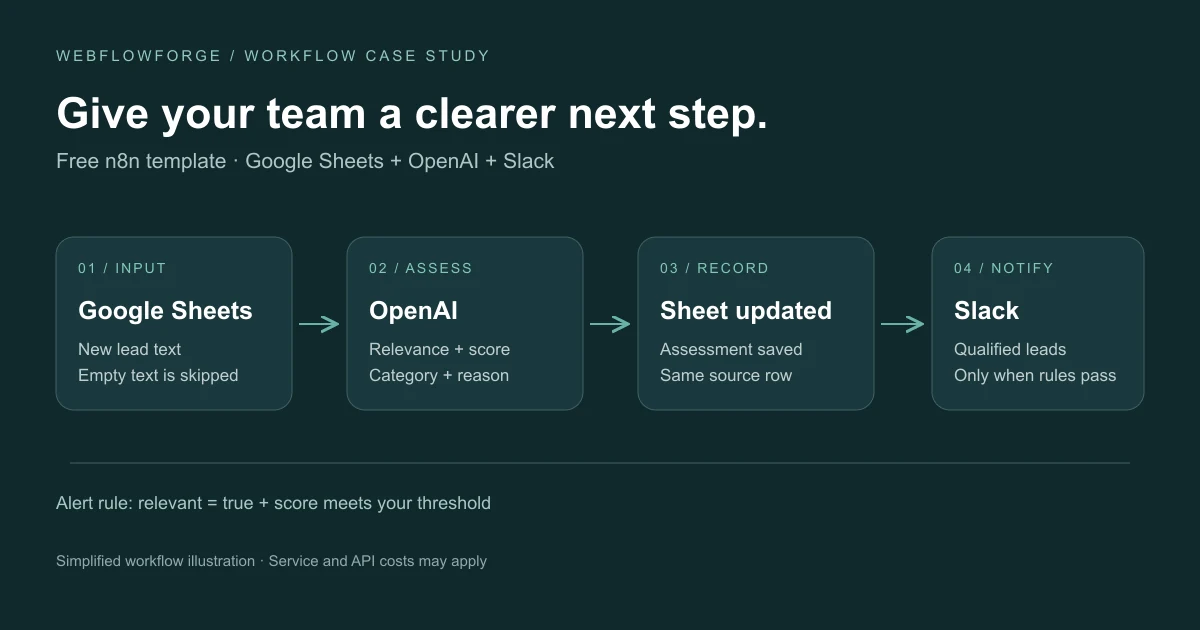
Our free n8n lead qualification template offers a starting point: it checks new Google Sheets rows, evaluates the text with OpenAI, records the assessment and alerts a Slack channel when a lead meets the relevance and score rules.
Why build lead qualification around Google Sheets?
The person asking for help was already working with a spreadsheet. That shaped the solution. We wanted to add a useful qualification step while keeping the place where they collected and reviewed their leads.
Some businesses are ready for a broader CRM implementation. Others want to keep costs and setup manageable while they improve a single part of their process. This template was built for that second situation: a small, understandable workflow that someone can configure around familiar tools.
The lesson was to start with how people actually work. A spreadsheet can be the right starting point for an automation project when it is already where the team's information lives.
Who the free template is for
We designed it for people who manage leads in Google Sheets and want a simple, affordable way to add qualification. That can include a founder handling sales, a small agency or a team that does not want to take on a more complex software setup yet.
The lead's original source can vary. Someone might research prospects using Apollo or ZoomInfo, record notes after a cold call, or enter responses to outbound emails manually. Those are examples of how information could arrive in the sheet, rather than built-in integrations with those platforms.
The template starts with the text already in Google Sheets. To assess intent usefully, that text needs to describe the enquiry or opportunity; a company name and email address alone do not explain what someone needs.
The right fit depends on your input quality and what “qualified” means for your business. A useful starting point is a clear offer, examples of opportunities you would pursue and examples you would reject.
What the published workflow does
The workflow checks for new rows every minute, ignores empty post_text values and adds your business context. The model returns relevance, a score, a category and a reason. Results are written back to the source row; Slack receives an alert only when relevance and the configured minimum score both pass.
Setup involves connecting Google Sheets, OpenAI and Slack, mapping the sheet columns and setting businessContext and minScore. The official template listing provides the required fields and configuration steps.
How to think about qualification before automating it
A useful qualification rule should reflect a decision your team can explain. For a web agency, an enquiry describing an upcoming website project might deserve attention, while an unrelated service promotion would not. This is an illustrative example, not a result measured with this template.
Before connecting a workflow to your daily process, assemble a small set of real examples and compare its decisions with your own. Look at missed opportunities as well as irrelevant alerts. A score is useful when it supports a review decision; it should not be presented as a verified probability that someone will buy.
What “free template” means
The template itself is available to use for free. You still need an n8n environment and the relevant service connections; hosting, subscriptions or API usage may carry separate costs. Custom implementation is separate from the free download.
Why we released it for free
This was a focused workflow we could build and share without the scope of a larger integration project. More complex automations take substantial implementation and testing time, which is what our paid work covers.
Free templates also help people discover our work. As an n8n verified creator, Pavel publishes workflows through the Webflowforge n8n creator page. Someone can try a practical solution, see how we approach a problem and contact us when they need a more connected system.
More than 700 downloads in five months
As of 4 November 2026, the template had received more than 700 downloads over the previous five months, according to Pavel's creator-reported figures. That is an encouraging sign that the problem resonates with people looking for an approachable automation.
We do not have user feedback or downstream performance data for this workflow. Downloads tell us about interest in the template; they do not establish how many people use it actively, how much time they save or whether it improves their sales results.
From a free template to a complete GTM workflow
The template handles a focused part of go-to-market operations: reviewing incoming lead information. A complete GTM workflow also needs to account for where leads originate, who owns them, how follow-up happens and how the outcome is recorded.
That is where our custom work begins. We help connect websites, CRMs, Slack, Calendly and other third-party tools through the APIs, MCP interfaces or connectors they make available. The implementation depends on the actions each platform supports and the access available.
A project might connect a website enquiry to qualification, a CRM record, an owner notification and a meeting-booking step. For HubSpot-based teams, our Webflow HubSpot integration service addresses the website-to-CRM handoff. These are examples of extensions we can scope for your business; they are separate from the free template.
Explore our AI workflow implementation services for qualification logic and our Webflow and third-party workflow automation services for the handoffs around it.
Use the template or plan a connected sales process
Get the free n8n template if this focused workflow fits your needs. For a more connected system, discuss your GTM automation project with us.
Bring the tools your team uses, the steps you repeat and the point where the process becomes difficult. We can help turn that into a scoped workflow with clear ownership and testing.
n8n lead qualification questions and answers
Is this n8n template free?
Yes, the template is free. Your n8n hosting, service subscriptions and model API usage are separate. You can use the template yourself or hire us for customization and implementation.
Do I need HubSpot, Zoho or Salesforce to use it?
No. This workflow keeps the lead information in Google Sheets. It is intended for people who want to improve that process without first moving their leads into a CRM.
Does it work with Microsoft Excel?
The published template targets Google Sheets. A Microsoft Excel version would require changes to the spreadsheet connection and row-handling steps.
Can I use leads originally found through Apollo or ZoomInfo?
You can prepare the relevant lead text in your sheet, whatever its original source. The template does not include a direct Apollo or ZoomInfo import. Connecting the sourcing step can be scoped as additional work.
Can someone without coding experience set it up?
The aim is an approachable workflow, but you still need to connect accounts, map the sheet fields, configure the qualification rules and test sample rows. The listing includes setup instructions, and we can help if you prefer an implemented solution.
Does a high score mean a lead will become a customer?
No. Treat the assessment as an aid to prioritization. Your team still needs to review the opportunity and establish fit through the sales process.
Can you build a full GTM workflow around our existing tools?
Yes. We scope custom automations around your website, CRM, qualification process and team tools, including Slack and Calendly where appropriate. Explore our workflow automation services or start a GTM project conversation.


Contact Us
- Webflow\Wordpress\Wix - Website design+Development
- Hubspot\Salesforce - Integration\Help with segmentation
- Make\n8n\Zapier - Integration with 3rd party platforms
- Responsys\Klavyo\Mailchimp - Flow creations



