
How to Add a Grounded AI Chatbot (RAG Agent) to Your Webflow Site
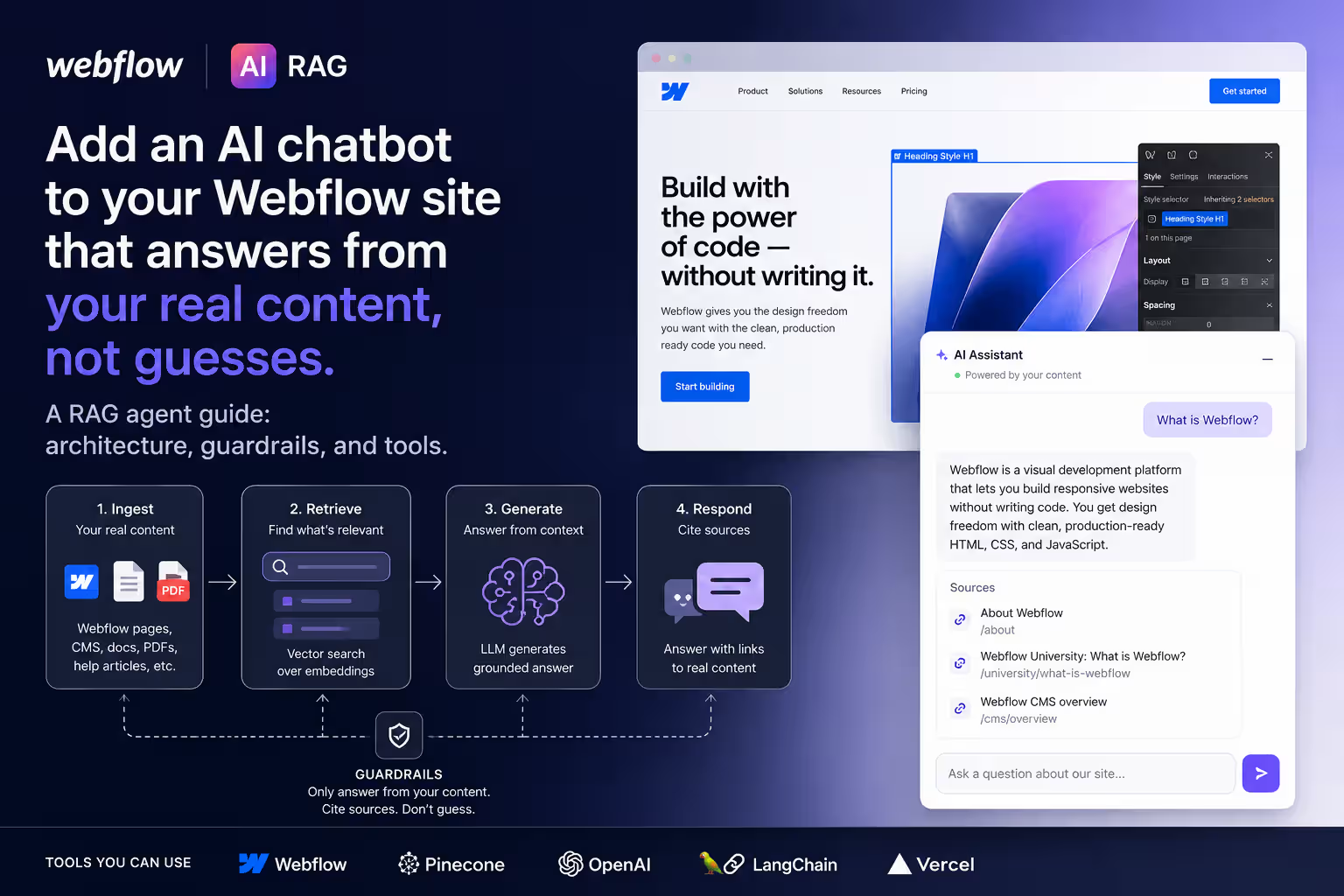


An AI chatbot on a Webflow site only earns its place if it answers from your content instead of making things up. The way to do that is RAG — retrieval-augmented generation: the agent retrieves the most relevant pieces of your own site before the model writes a word. This playbook shows how a grounded RAG agent is built and deployed on Webflow, the guardrails that keep it honest, and how to ship one without leaking your data or your budget.
What is a RAG chatbot, in one paragraph?
A RAG chatbot stores your website content (services, FAQs, docs, blog posts) as searchable “vectors,” finds the passages most relevant to each question, and instructs a large language model to answer only from those passages. The result: accurate, on-brand answers with far less hallucination than a generic chatbot that relies on the model's memory.
Why put one on a Webflow site?
- Answer before the form. Most visitors have one or two questions (“do you migrate WordPress?”, “do you integrate HubSpot?”). A grounded agent answers instantly instead of pushing them to a contact form.
- 24/7 and on-brand. It speaks in your voice, from your real content, around the clock.
- Lead capture. When intent is high, the agent can hand off to a form or booking link — turning a question into a conversation.
- GEO benefit. The same structured, answer-first content that powers the agent also helps AI search engines cite you.
How the RAG agent is built (architecture)
Here's the architecture at a high level — the thinking, not the secret tuning. Five moving parts:
- Ingest your content. Pull your Webflow pages, CMS items, and FAQs into a pipeline (the Webflow CMS API or a crawl). Each document is split into small, meaningful chunks.
- Embed and store. Each chunk is converted into an embedding and saved in a vector database (e.g., a Postgres + pgvector setup like Supabase) alongside metadata such as page URL and last-updated date.
- Retrieve. When a visitor asks, the agent embeds the question, runs a similarity search, and pulls back the top matching chunks — with a relevance threshold so weak matches are ignored.
- Generate, grounded. The LLM receives the retrieved chunks plus a strict prompt contract: answer only from this context, cite the source page, and ask a clarifying question if the context is missing.
- Orchestrate. A workflow engine (n8n or Make) ties it together and logs every question for review.
The prompt contract is the real work
The model is the easy part. The value is the contract you give it: only use retrieved context, never invent a service, return a confidence signal, and route to a human when unsure. That single rule is what separates a trustworthy assistant from a liability.
Deploying it on Webflow
On the Webflow side, the agent lives in a lightweight chat widget embedded with custom code (an embed in the site footer or a reusable component). The widget calls your agent's endpoint; your content and API keys stay server-side. Because it's just an embed, it works on any Webflow plan without touching your design system.
Want to apply this to your setup?
Guardrails, keeping it current, and FAQ
The difference between a helpful agent and an embarrassing one is governance, not model choice.
Guardrails that keep it honest
- Grounding: the agent answers only from retrieved content — if the answer isn't there, it says so.
- Confidence + fallback: low-confidence questions trigger a clarifying question or a handoff to a human or contact form.
- Scope limits: it stays on your business; off-topic prompts are politely declined.
- Logging: every conversation is stored so you can spot content gaps and improve.
Keeping answers up to date
Stale answers erode trust fast. Trigger a re-index whenever you publish or edit Webflow content (a webhook or scheduled sync), so the agent always reflects your live site — not last quarter's pricing.
Q: How much does it cost to add an AI chatbot to a Webflow site?
A: Most of the cost is the one-time build (content pipeline, retrieval, guardrails, widget). Ongoing costs are small and usage-based: embeddings, the LLM's per-query tokens, and vector-database hosting. A focused single-site agent is far cheaper to run than most subscription chatbot products.
Q: Can a Webflow chatbot answer from my own content without hallucinating?
A: Yes — that's the entire point of RAG. By forcing the model to answer only from retrieved passages of your site, and to say “I'm not sure” when the content is missing, you eliminate the vast majority of made-up answers.
Q: Do I need to write code to add an AI agent to Webflow?
A: The chat widget itself is a simple embed, but the retrieval pipeline, guardrails, and content sync need engineering to do safely. It's the kind of build we handle end to end.
Want a grounded AI agent on your site?
Webflowforge builds AI workflow implementation and Webflow automation services — including RAG agents that answer from your real content, capture leads, and stay in sync with your site. Tell us about your project and we'll scope it with you.
Related playbook: How to Reduce Customer Support First-Response Time by 40% Using RAG





