
How to Reduce Customer Support First-Response Time by 40% Using RAG



Every time a ticket lands in your support inbox, your team likely asks the same three questions, digs through outdated documentation, and replies with a slightly different variation of last week's answer. You don’t have a support volume problem; you have a data retrieval and routing problem disguised as an operational bottleneck. By implementing a Retrieval-Augmented Generation (RAG) pipeline, you can cut your first-response time by 40% or more. The core system architecture relies on four interconnected tools acting as a unified automation loop:
- Intake Engine: Zendesk or Gmail captures incoming tickets.
- Workflow Spine: n8n normalizes data and handles routing logic.
- Vector Memory: Supabase stores historical internal knowledge and "truth objects."
- Drafting Engine: ChatGPT generates contextual, highly accurate draft responses.
How can RAG reduce customer support response times?
Implementing a Retrieval-Augmented Generation (RAG) pipeline lowers customer support first-response times by using an automation platform like n8n to instantly fetch relevant technical documentation from a vector database (such as Supabase) the moment a ticket arrives, generating an accurate draft response for agent review.
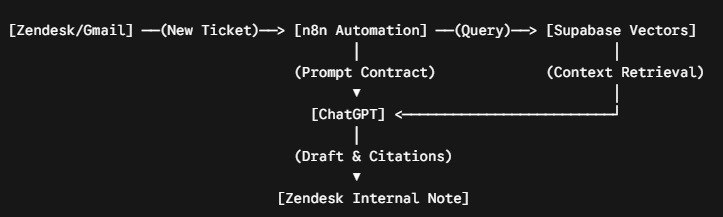
To eliminate automated hallucinations and maintain strict quality control, n8n calls the LLM with a rigid prompt contract: it must draft replies exclusively from retrieved Supabase sources. If the technical documentation is conflicting or missing, the model is instructed to generate a targeted clarification question rather than guessing. The final AI-generated draft, along with its specific source citations, is pushed back into Zendesk as an internal note. This keeps a human in the loop for final approval while simultaneously saving the verified answer as a reusable "truth object" for future inquiries.
Step-by-Step Guide: Building an Automated Support Ticket Triage Workflow with n8n
Managing a high-volume support queue during a system outage quickly exposes triage inefficiencies. When a flood of tickets arrives reading "API down," engineers frequently burn hours determining whether the root cause is a rate-limiting issue, an auth misconfiguration, or a global incident. To automate this sorting layer, configure an n8n webhook trigger to fire on every new Zendesk ticket. The workflow instantly extracts key metadata, including the ticket body, sender domain, custom environment fields, and the last 20 internal notes, rewriting the user's issue into a single, clean query optimized purely for vector database retrieval.
{
  "ticket_id": "98432",
  "customer_tier": "Enterprise",
  "product_version": "v4.2.1",
  "cleaned_semantic_query": "API returning 401 unauthorized status error code on webhook authentication loops"
}
Key Retrieval Safeguards to Implement:
- Separate Classification from Answering: Do not let your LLM classify the ticket and draft the response in the same API call, as this significantly increases hallucination rates.
- Multi-Layered Context Matching: Query Supabase using semantic vector search combined with strict metadata filtering—such as active incident flags, customer tiers, and software version numbers.
- Human-in-the-Loop Reviews: Post all AI drafts back to the CRM strictly as internal notes rather than public replies to protect customer configuration files from unverified steps.
Once retrieved, the system pairs the user query with historical data from the same domain over the past 30 days. To eliminate irrelevant search noise, enforce a strict vector similarity score threshold and filter results by the user's current product version. When a match is found, n8n formats the draft inside Zendesk, appending explicit citations back to internal tracking documents. Agents review, tweak, and send the response with a single click, allowing your senior technical staff to step away from the triage bottleneck entirely.
Want to apply this to your setup?
Building a Reusable AI Knowledge Base: Transforming Engineering Tickets Into Vector Data
The primary obstacle to scaling a RAG support system isn't the technology—it's the friction of capturing tribal knowledge from senior engineers. Expecting busy technical teams to pause their day and manually write comprehensive documentation rarely works because the administrative tax is immediate while the payoff is abstract. The solution is to design your automation workflow to capture internal knowledge as a natural byproduct of resolving everyday support tickets. By embedding structured data capture directly into the tools your team already uses, you convert scattered Slack snippets, GitHub comments, and internal notes into clean, structured data.
The 10-Second Data Integrity Framework
To build a self-sustaining knowledge base, configure n8n to request three quick data inputs from your team right before a ticket is marked as resolved:
| Step | Action Required in CRM (Zendesk/HubSpot) | System Processing via n8n & Supabase | Business Outcome |
| 1 | Select Primary Component Tag | Validates feature area impacted. | Routes to engineering. |
| 2 | Input System Error Code / Identifier | Creates explicit metadata search indexes. | Eliminates manual routing. |
| 3 | Set Resolution State (Confirmed / Workaround) | Promotes verified payload to long-term vector storage. | Prevents systemic drift. |
If an engineer skips these parameters, the response still sends to the client, but the system prevents the data from being promoted into the primary vector library. This approach avoids heavy-handed policing and instead gates what enters your AI's long-term memory. Shift team metrics away from ambiguous "documentation coverage" and focus on clear, revenue-driving KPIs like repeat answer deflection and mean time to resolution (MTTR). When engineers see that spending ten seconds tagging an issue completely blocks dozens of identical Slack interruptions later on, adoption scales naturally.
Q: How do you prevent an AI support bot from hallucinating?
A: By establishing a strict prompt contract via n8n. The LLM must be explicitly instructed to draft replies only using contexts fetched from your verified vector database. If documentation is missing, the model outputs a clarification question rather than generating unverified code or answers.
Q: What is the best database architecture for an internal technical RAG system?
A: A Postgres database utilizing the pgvector extension (such as Supabase) paired with semantic embeddings. This configuration allows you to combine semantic text search with structured metadata filters like product versions or account tiers.
Want this built for you?
Webflowforge offers AI workflow implementation — RAG support systems, triage, and knowledge automation — for service companies and SaaS teams. Tell us about your project and we'll scope it with you.
Related playbook: Your Docs Are Broken Because No One Owns the Truth





