Auto-Sync SaaS Product Data + CRM into a Webflow Marketing Site



SaaS marketing sites rot the moment the product moves faster than the marketer. New integration ships, the directory is stale. New release, the changelog is a week behind. A form gets filled, and the UTM source is lost by the time it reaches sales.
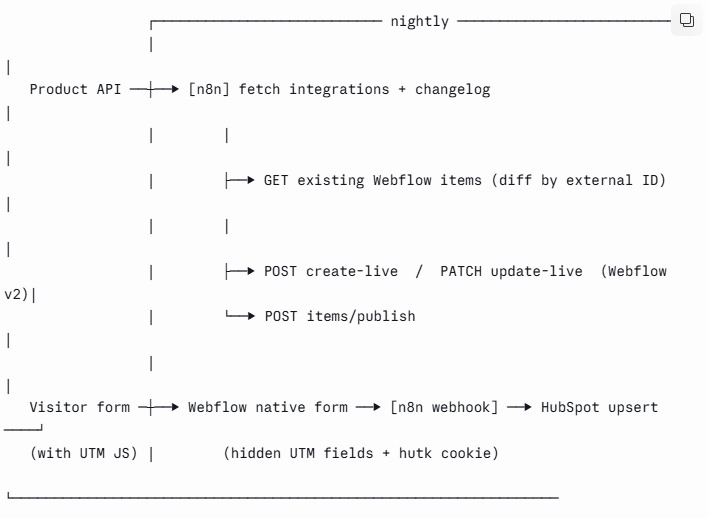
This workflow closes all three gaps by treating the Webflow CMS as a presentation layer that automation keeps fresh:
- Product → Webflow. A scheduled n8n job pulls your live integrations list and release notes from your product API and upserts them into Webflow CMS collections via the Data API v2.
- Webflow → HubSpot. Native Webflow forms post to n8n, which enriches with UTM/attribution and upserts the contact into HubSpot, deduped by cookie.
- Visitor → personalized page. A small client script swaps hero content by campaign parameter.
Everything below is copy-adaptable. Replace the placeholders and it runs.
Prerequisites
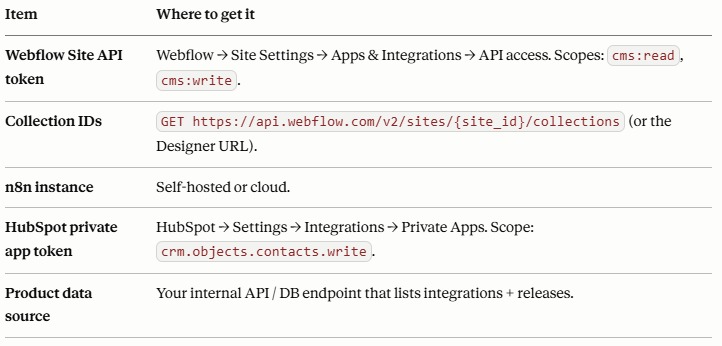
Webflow Data API base URL: https://api.webflow.com/v2. Auth header on every call: Authorization: Bearer YOUR_WEBFLOW_TOKEN.
Part 1 — Webflow CMS collections (the presentation layer)
Create two collections. The critical field is External ID — the product's own primary key for each record. It's how the sync matches an existing item instead of creating duplicates.
Integrations collection fields
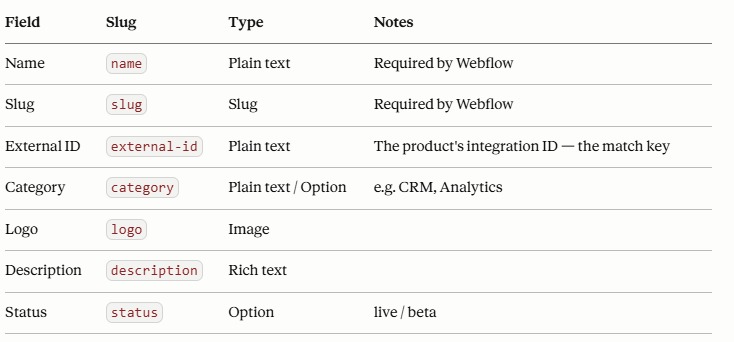
Changelog collection fields: name, slug, external-id, release-date (date), body (rich text), version (plain text), type (option: feature/fix/improvement).
Part 2 — n8n sync (product → Webflow CMS)
Node-by-node. Runs nightly; upserts by External ID.
Node 1 — Schedule Trigger — daily, e.g. 04:00.
Node 2 — HTTP Request: fetch product data — GET https://api.yourproduct.com/integrations (Bearer your product token). Returns an array like [{ id, name, category, logoUrl, description, status }, ...].
Node 3 — HTTP Request: get existing Webflow items (to diff)
GET https://api.webflow.com/v2/collections/{INTEGRATIONS_COLLECTION_ID}/items?limit=100
Authorization: Bearer YOUR_WEBFLOW_TOKEN
Paginate with offset if you have >100 items.
Node 4 — Code: diff into creates vs updates
const product = $('Fetch Product Data').all().map(i => i.json); // array of integrations
const existing = ($json.items || []);
const byExtId = {};
for (const it of existing) byExtId[it.fieldData['external-id']] = it.id;

const creates = [], updates = [];
for (const p of product) {
  const payload = {
    fieldData: {
      name: p.name,
      slug: p.name.toLowerCase().replace(/[^a-z0-9]+/g, '-').replace(/^-|-$/g, ''),
      'external-id': String(p.id),
      category: p.category || '',
      description: p.description || '',
      status: p.status || 'live'
    }
  };
  const existingId = byExtId[String(p.id)];
  if (existingId) updates.push({ id: existingId, ...payload });
  else creates.push(payload);
}
return [{ json: { creates, updates } }];
Node 5 — HTTP Request: create new items (live)
POST https://api.webflow.com/v2/collections/{COLLECTION_ID}/items/live
Authorization: Bearer YOUR_WEBFLOW_TOKEN
Content-Type: application/json

{ "items": {{ $json.creates }} }
create-item-liveaccepts a single item or anitemsarray and publishes immediately. Loop withSplitInBatchesif you exceed the per-request item cap.
Node 6 — HTTP Request: update changed items (live)
PATCH https://api.webflow.com/v2/collections/{COLLECTION_ID}/items/{itemId}/live
Authorization: Bearer YOUR_WEBFLOW_TOKEN
Content-Type: application/json

{ "fieldData": { ...changed fields... } }
For bulk, PATCH /items/live updates up to 100 items in one call.
Node 7 — (optional) Publish — if you created staged items instead of live:
POST https://api.webflow.com/v2/collections/{COLLECTION_ID}/items/publish
{ "itemIds": ["id1", "id2", ...] }
Duplicate Nodes 2–7 for the Changelog collection (or parameterize with a loop over both collection configs).
Part 3 — HubSpot lead pipe with UTM attribution
Keep Webflow's native (styled) form; capture attribution client-side; push to HubSpot server-side.
Step A — UTM capture script (site-wide, before </body>):
<script>
(function () {
  const p = new URLSearchParams(location.search);
  const keys = ['utm_source','utm_medium','utm_campaign','utm_term','utm_content'];
  keys.forEach(k => { const v = p.get(k); if (v) localStorage.setItem(k, v); });
  // populate hidden inputs named exactly like the keys
  document.querySelectorAll('form').forEach(f => {
    keys.forEach(k => {
      const input = f.querySelector('[name="'+k+'"]');
      if (input) input.value = localStorage.getItem(k) || '';
    });
  });
})();
</script>
Add hidden fields (utm_source, etc.) to the Webflow form.
Step B — Webflow form → n8n webhook.
Point the form action at an n8n Webhook node (or use Webflow's form webhook in Site Settings). Payload includes the visible fields, hidden UTM fields, and the hubspotutk cookie if you forward it.
Step C — n8n → HubSpot Forms Submission API (handles dedupe + attribution natively):
POST https://api.hsforms.com/submissions/v3/integration/submit/{PORTAL_ID}/{FORM_GUID}
Content-Type: application/json

{
  "fields": [
    { "name": "email",       "value": "{{ $json.email }}" },
    { "name": "firstname",   "value": "{{ $json.firstName }}" },
    { "name": "utm_source",  "value": "{{ $json.utm_source }}" },
    { "name": "utm_campaign","value": "{{ $json.utm_campaign }}" }
  ],
  "context": {
    "hutk": "{{ $json.hubspotutk }}",
    "pageUri": "{{ $json.pageUri }}",
    "pageName": "{{ $json.pageName }}"
  }
}
The hutk merges the submission into the visitor's existing contact (no duplicates) and stitches the analytics session. Set lifecycle stage and lead source on the mapped HubSpot properties so routing/scoring fire on arrival.
Want to apply this to your setup?
Part 4 — Personalization (optional)
Swap hero proof points by campaign, invisible to the marketer editing the page:
Tag hero variants with data-industry="finance" etc.; paid campaigns append ?industry=finance.
Gotchas & error handling
- Rate limits. Webflow Data API v2 defaults to ~60 requests/min. Batch and add a
Waitnode between pages/items. - Slug collisions. Two integrations named similarly can generate the same slug — append the external ID to the slug if you hit
409 Conflict. - Idempotency. Always match on
external-id, never on name — names change, IDs don't. This is what makes re-runs safe. - Draft vs live. Creating via
/items/livepublishes immediately. Use staged/items+/items/publishif you want editorial review before go-live. - Locales. If the site is localized, the live endpoints accept a
cmsLocaleId— pass it or items land only in the primary locale. - HubSpot dedupe. Without the
hutkincontext, you'll create duplicate contacts on repeat visits.
Validation checklist
-
GET .../collectionsreturns your two collection IDs. - Manual run of Node 2 returns real product data.
- First sync creates items; second sync creates zero (proves upsert-by-external-ID works).
- Changing one product record updates exactly one Webflow item on next run.
- A test form submit with
?utm_source=testlands in HubSpot with the source populated and no duplicate contact. - Personalized hero shows/hides correctly with
?industry=set.
Q: Will the sync create duplicate items in my Webflow CMS?
A: No — as long as every record carries an external-id (your product's own ID), the workflow matches on that key and updates the existing item instead of creating a new one. The reliable test is running the sync twice: the first run creates items, the second creates zero. Never match on the item name, since names change and IDs don't. If you'd rather not build this yourself, our Webflow automation and AI integration service handles the setup end-to-end.
Q: Does this only work with HubSpot, or can I use Salesforce?
A: The pattern is CRM-agnostic. HubSpot is shown here because its Forms Submission API handles cookie-based dedupe and UTM attribution natively, but the same n8n middleware maps just as cleanly to Salesforce Leads/Contacts — you swap the final node's endpoint and field mapping and keep everything else. See how we approach CRM and HubSpot integrations for either stack.
Q: Can my marketing team still edit the synced pages, or will the next sync overwrite them?
A: They can edit any field the sync doesn't own. Keep automated fields (name, description, status) driven by the product API, and leave marketing-owned fields (custom copy, featured toggles, SEO overrides) out of the sync payload so they're never touched. This split is part of how we architect Webflow marketing sites for SaaS — automated where it should be, editable where it matters.
Related services: Webflow development · AI & automation (Make / Zapier / n8n) · CRM & HubSpot integration · WordPress to Webflow migration · Book a SaaS marketing site audit