How to Eliminate Inbound Lead Dropoffs by 80% Using n8n



The moment a form submission lands on your website, your marketing stack often starts misaligning: your landing page says "thanks," your CRM logs a "new lead," Slack pings an unassigned notification, and days later you are wondering why your demo calendar remains empty. This leakage isn't a traffic quality issue; it is a structural intake failure. To eliminate inbound dropoffs, you must build a deterministic data pipeline using four specialized tools with strict operational roles:
- Front Door: Webflow captures structured inputs alongside messy, qualitative user signals (e.g., custom problem descriptions, company domains).
- Traffic Controller: n8n acts as the central workflow automation spine to validate, normalize, and distribute payloads.
- Source of Truth: Supabase acts as an immutable ledger storing every single lead event, timestamp, and routing mutation.
- Research Layer: Perplexity dynamically enriches raw data, transforming basic forms into deep contextual briefings.
How do you eliminate website inbound lead dropoffs using automation?
To eliminate inbound lead dropoffs, use n8n to build an asynchronous "Write First, Enrich Second" automation pipeline. This architecture instantly writes incoming form submissions into a secure database like Supabase before triggering enrichment APIs like Perplexity, preventing external API rate limits or timeouts from losing hot sales opportunities.
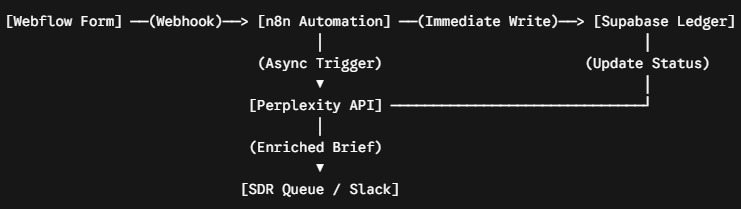
Asynchronous Lead Routing: Closing the Hot Lead Follow-Up Gap With the "Write First, Enrich Second" Rule
The most common engineering mistake in lead routing is chaining synchronous API requests. When an n8n workflow receives a Webflow payload and immediately calls Perplexity for enrichment before writing to a database, a single API timeout or rate limit drops the lead entirely. The operational fix is an asynchronous "Write First, Enrich Second" framework.
The Inbound Pipeline Execution Architecture
By separating ingestion from enrichment, an API failure at the research stage will never result in a lost sales opportunity. If Perplexity errors out, n8n flags the row as enrichment_failed in Supabase, but the lead is safely retained and instantly routed to the human sales queue based on its primary form inputs.
Want to apply this to your setup?
Setting Inbound Lead SLAs: Operationalizing Lead Flow With n8n and Supabase Timestamps
An automated routing pipeline will quickly degrade into a graveyard of broken scripts if it isn't treated like a production software application. To make your inbound system durable, you must establish hard Service Level Agreements (SLAs) inside your data layer. Every high-intent lead written to Supabase should be stamped with a next_action_at countdown timer.
// Example of a Supabase lead ledger row with an automated SLA countdown timer
{
  "lead_id": "usr_9f823a10",
  "company_domain": "enterprise-client.com",
  "ingested_at": "2026-06-11T14:00:00Z",
  "next_action_at": "2026-06-11T14:10:00Z",
  "sla_status": "pending_ae_claim",
  "routing_rule_version": "v2.4"
}
If an Account Executive or Sales Development Representative fails to claim the lead within 10 minutes, n8n escalates the status—first via a direct Slack notification to the owner, and then via an automated manager alert.
Furthermore, dynamic routing rules should never be hardcoded into loose conditional blocks. Store your routing criteria inside a versioned Supabase lookup table containing fields for effective_date and changelog_notes. When an attribution dispute arises, you can look up the exact rule state that executed at the time of ingestion, turning chaotic operational debates into transparent, reproducible event logs.
Q: What is the 'Write First, Enrich Second' rule in automated lead processing?
A: The 'Write First, Enrich Second' rule separates data ingestion from third-party enrichment. By immediately saving incoming webhooks to your database before calling enrichment APIs (such as Perplexity or Clearbit), you ensure that external service downtime or API rate limits will never drop a live lead out of your pipeline.
Q: How can you enforce internal sales response SLAs automatically using n8n?
A: When a form submission is logged, calculate a hard countdown timestamp (e.g., current time + 10 minutes) and save it to a database column like next_action_at. Configure an n8n workflow template to poll or listen for unresolved rows where the system time surpasses that value, instantly triggering internal notification escalations via Slack or email.